Regresar
Regresar
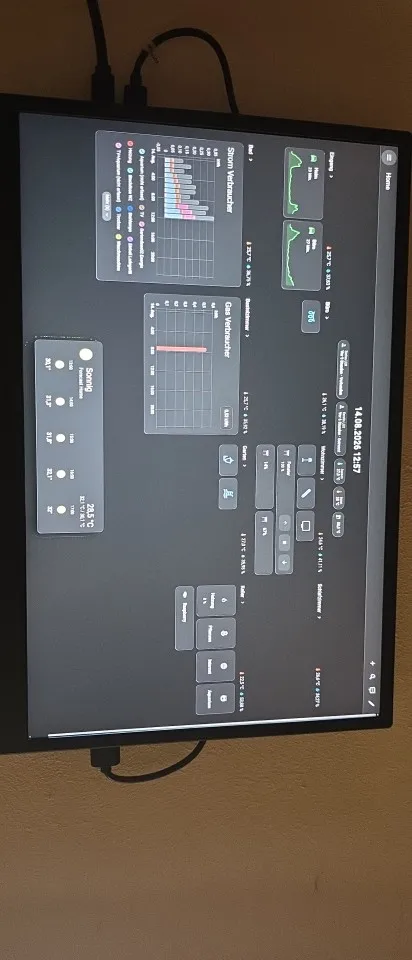
14 Inch Touchscreen Hdmi Monitor

14 Inch Touchscreen Hdmi Monitor

Precio regular $511.99 Precio de oferta $464.99
9% de descuento Free Shipping

Color Monitor-Touchscreen
This discount is based on purchasing the main product
Secure Payment

Secure Payment

Fast Delivery

Fast Delivery

Money Back Guarantee

Money Back Guarantee

24/7 Support

24/7 Support

Quality Assurance

Quality Assurance

Shipping:

Free shipping on all orders . See details

Delivery:

Estimated between Oct 08, 2026 and Oct 10, 2026 Ships within 1-3 business day after payment clears. | SHOP Track Order | Ourlum Orders | Track Orders

Returns:

30 days returns. 100% Money back guaranteed. See details

Safe Checkout
Shop with confidence. FAQs
OurLum Money Back Guarantee.

Get the item you ordered or your money back. WHY TRUST OURLUM Learn more. ALL FAQs

  • Description
  • Shop with confidence
  • Guaranteed

Pisichen 14 Inch Touchscreen HDMI Monitor for Raspberry Pi and Gaming

See stunning 1920x1200 visuals anywhere. This touchscreen HDMI monitor expands your workspace instantly. Mount a Raspberry Pi inside the back to clear your desk.

Key Features

  • High-Resolution Panel Shows sharp images at 1920x1200 resolution.
  • Capacitive Touch Screen Responds swiftly to fingers or stylus input.
  • Built-In Stereo Speakers Provides clear audio without extra headphones.
  • Dual Connection Ports Accepts HDMI signals and USB-C power data.

Product Description

The Pisichen display combines vibrant color accuracy with reliable hardware. This touchscreen monitor features an IPS panel that handles bright indoor lighting well. You get smooth scrolling across Windows, gaming consoles, and mobile devices.

Product Overview

A compact portable screen built for flexible setups. It replaces bulky desk displays with a lightweight frame. You get dual-function inputs for video and control signals.

Key Benefits

  • Instant Expanded Workspace Extend your laptop view seamlessly.
  • Streamlined Desktop Setup Slide your Raspberry Pi into the rear tray.
  • All-Day Comfort Switch between landscape or portrait modes easily.

Features

Drivers are not required for basic plug and play operation. A six-zero Hertz refresh rate and five millisecond response time reduce motion blur during gameplay. A seventy-five by fifty-five millimeter VESA pattern secures the unit firmly to any arm.

Specifications

  • Panel Size Measures fourteen diagonal inches across the bezel.
  • Signal Interface Connects via standard HDMI wires or USB-C ports.
  • Touch Capability Registers five simultaneous finger points with extra wiring.
  • Mounting Options Fits standard seventy-five by fifty-five millimeter brackets.

What’s Included

Your order ships the monitor panel, pre-attached mounting bracket, and cooling system components. You must supply your own connection cables and computing device.

How to Use

Slip your single-board computer into the back holder. Route power and data cables through the opening. Press the HDMI connector to the video source until you see the desktop. Attach the USB wire to activate the touch layer.

Customer Benefits

You save valuable desk space by combining storage and viewing. The quiet cooling fan keeps internal chips running cool during heavy tasks. Clean cabling makes your workspace look professional immediately.

Ideal Uses

  • Mobile Office Work Pair with ultrabooks for faster document handling.
  • Retro Game Consoles Connect older handheld systems for crisp playback.
  • Media Streaming Link smart sticks for dedicated movie watching.

Who It’s For

Developers seeking compact coding stations love this layout. Gamners appreciate the fast reaction speeds during matches. Creators enjoy the wide viewing angles when sharing screens with clients.

5 Frequently Asked Questions

Does it work with Apple Laptops?
Yes. You receive single-touch functionality on macOS devices without extra setup.

Why do I need multiple cables?
Some boards separate power and video lines. You attach the extra USB wire to unlock the gesture controls.

Shop OurLum with confidence—secure payments, fast shipping, easy returns, order tracking, and reliable support.

At OurLum.com, we don’t just promise quality—we guarantee it. Every product is carefully selected and tested to meet real-life needs, and your satisfaction is 100% backed by our no-hassle return policy. If it doesn’t work for you, we’ll make it right—fast. Shop confidently knowing you're getting trusted products, secure checkout, and real support when you need it. Because at OurLum, your peace of mind comes first

Product Gallery

14 inch Monitor for Raspberry Pi 5 4 3 Touchscreen 1920x1200 16:10 Display HDMI USB Interface for Computer Program Monitors

Smarter Living Picks

Deals on related products

  • 5 stars: 1 (50%)
  • 4 stars: 1 (50%)
  • 3 stars: 0 (0%)
  • 2 stars: 0 (0%)
  • 1 star: 0 (0%)
E
Eugenie Kutch

Works perfectly with a PI 3, even the supply voltage matches. I can highly recommend the display. Top product with instructions in German.

M
Maira Larkin

Good product